



AI social media generators are transforming how businesses handle content creation. These tools use advanced language models to turn inputs like blog posts or campaign briefs into posts tailored for platforms like LinkedIn, Instagram, and X (formerly Twitter). With 90% of businesses reporting reduced production times, they help cut weekly content creation from 12–15 hours to just 2–3.
Key Takeaways:
- Efficiency: Automate repetitive tasks like drafting captions and formatting posts.
- Platform-Specific Content: Tailor posts to fit each platform’s unique style and rules.
- Brand Voice: Maintain consistency by training AI with your best-performing content.
- Analytics: Use performance data to refine strategies and improve engagement.
By combining AI’s speed with human oversight, businesses can scale their social media presence while ensuring quality and relevance.
AI System to Automatically Create and Publish Social Media Content
sbb-itb-c00c5b1
What AI Social Media Generators Do
AI social media generators are designed to help businesses keep up with the fast-paced demands of social media marketing. They take various inputs – like blog posts, URLs, product descriptions, or transcripts – and turn them into platform-specific posts. These tools handle platform rules, adjust tone, and format content automatically, making it easier to create posts that fit each social channel’s unique requirements.
Core Functions of AI Social Media Generators
At their core, these tools excel at content atomization. This means they break down long-form content into multiple posts tailored for different platforms. For instance, a 1,500-word article can be turned into several LinkedIn updates, a handful of X posts, and Instagram captions, all tailored to each platform’s style and audience preferences [5].
Formatting is another area where these tools shine. They automatically adjust content to meet platform-specific guidelines. For example:
- LinkedIn posts often perform better with over 1,300 characters and a compelling opening.
- X (formerly Twitter) limits posts to 280 characters.
- Instagram captions need a strong hook within the first 125 characters to grab attention [1][4].
With an AI generator, these adjustments happen behind the scenes, saving you from manually tweaking each post [1].
"AI handles repetitive production tasks – drafting captions, suggesting hashtags, optimizing posting times – but strategy, community engagement, crisis management, and creative direction still require human judgment." – Sarah Mitchell, CTO, Aibrify [1]
Many of these tools also integrate performance tracking. They monitor engagement metrics and analyze audience sentiment in real time. Some even use predictive analytics to estimate how well a post might perform before it’s published [8]. This added layer of insight helps marketers refine their strategies.
Types of Content These Tools Can Create
AI social media generators go beyond repurposing long-form content. They can produce a wide variety of content formats to meet the specific needs of different platforms.
| Content Type | Examples |
|---|---|
| Text | Captions, hashtag sets, X threads, LinkedIn posts, poll questions, comment replies |
| Visual | AI-generated images, carousel slides, quote graphics, infographics, branded logos |
| Video | Scripts for Reels, TikTok, or Shorts; auto-generated subtitles; B-roll suggestions; AI-avatar videos |
| Strategic | Content calendars, A/B test headline variations, trending-topic quizzes, and polls |
This flexibility allows marketers to create content that resonates with their audience while saving time. For example, while writing a 500-word blog post manually might take around 4 hours, AI tools can generate multiple social posts and calls-to-action from the same content in just seconds [6]. With 78% of social media teams using AI for drafting content – and 92% still reviewing posts before they go live – these tools act as powerful assistants, complementing human creativity and AI tools [7].
Key Features to Look For in AI Social Media Generators
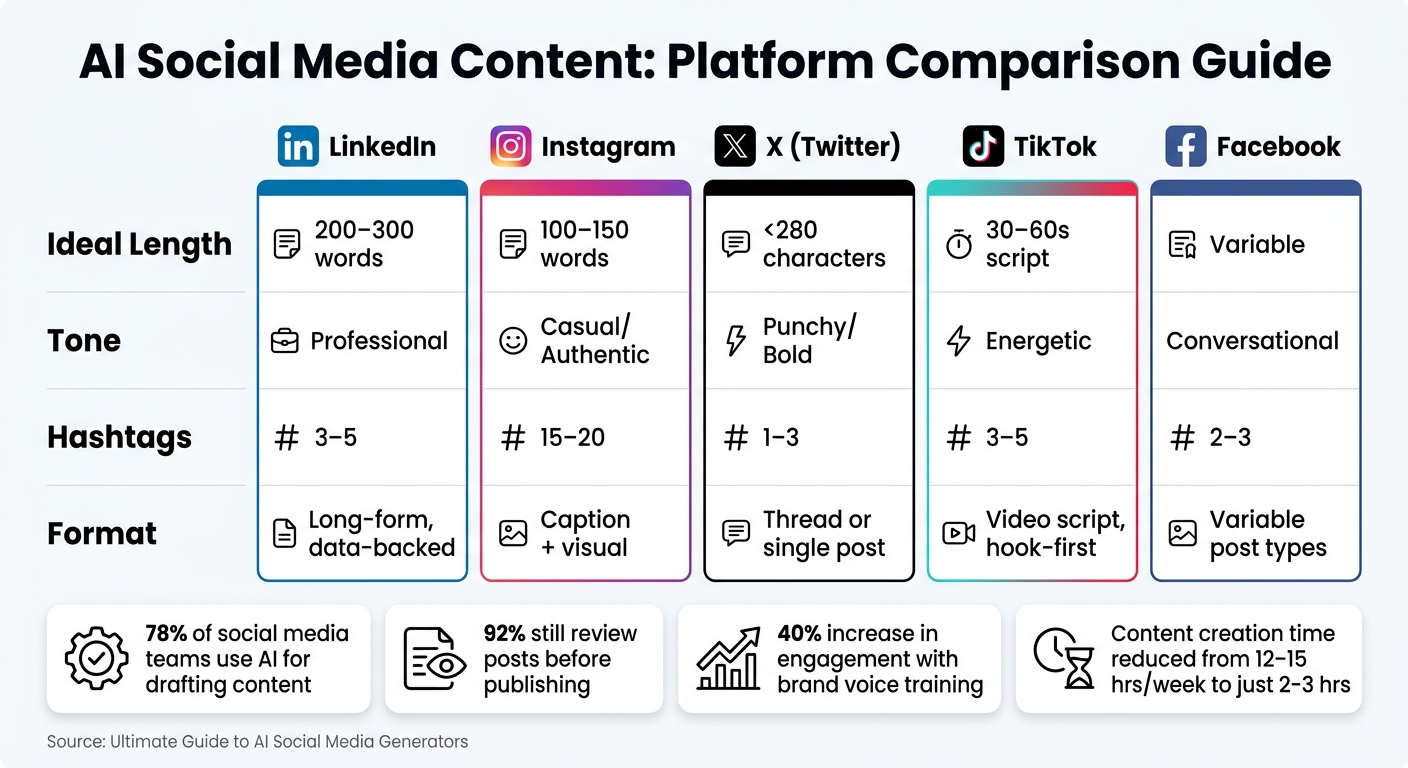
AI Social Media Generators: Platform-by-Platform Content Guide
When it comes to AI tools for social media, not all are created equal. The best ones go beyond just producing content – they help you craft strategic, tailored posts that truly connect with your audience. Here’s what to keep an eye on when choosing the right AI generator.
Brand Voice Customization
One of the biggest challenges with AI content is keeping it from sounding too generic. In fact, 30.6% of marketing teams report struggling to maintain a consistent brand voice with AI tools [10]. This is where customization features come into play.
Look for tools that allow you to create Brand Voice Profiles. These profiles let you upload 10–20 examples of your top-performing posts so the AI can learn your company’s tone, vocabulary, and style [3][1]. The best tools apply these profiles automatically, saving you from having to tweak every single post. Brands that invest in voice training for their AI often see a 40% increase in audience engagement, compared to those using generic outputs [1].
"The secret to better AI output isn’t better prompts – it’s better inputs." – Sari Azout, Founder, Sublime [11]
By defining your voice, you can ensure your content feels authentic and adaptable across various platforms.
Multi-Platform Content Adaptation
A good AI tool doesn’t just generate content – it tailors it for each platform. Here’s what platform-specific content should look like:
| Platform | Ideal Length | Tone | Hashtags |
|---|---|---|---|
| 200–300 words | Professional | 3–5 | |
| 100–150 words | Casual/Authentic | 15–20 | |
| X (Twitter) | <280 characters | Punchy/Bold | 1–3 |
| TikTok | 30–60s script | Energetic | 3–5 |
| Variable | Conversational | 2–3 |
The best tools follow a one-to-many approach: they take a single idea and instantly create platform-specific versions [3]. This helps avoid the all-too-common mistake of copy-pasting the same content across channels, which can hurt performance and signal low effort to platform algorithms [10].
Performance Analytics and Feedback
The best AI tools don’t stop at creating content – they help you measure and improve it. Built-in analytics can track performance and guide future strategies.
Some advanced platforms, like Sprout Social, analyze over 30 billion daily messages to identify trends and audience sentiment [9]. Others offer predictive scoring, which estimates engagement potential before you even publish a post [12]. Tools with these kinds of features create a feedback loop, allowing the AI to learn what works for your audience and refine its output over time. This way, your content strategy keeps evolving rather than staying stagnant.
How to Use AI Social Media Generators in Your Workflow
Ready to bring AI into your social media game? With 78% of marketers already using AI at some stage of their content creation process [3], it’s clear these tools can make a big difference. Here’s how to seamlessly integrate them into your workflow for more efficient and impactful results.
Setting Up Brand Guidelines Before You Start
Before diving into content creation, take a moment to nail down your brand guidelines. This step isn’t optional – it’s the foundation for ensuring your AI-generated posts reflect your brand’s personality. Start by creating a "Brand Voice + Claims Pack", a concise document (just 1–2 pages) that includes:
- A clear description of your target audience and positioning.
- 3–10 fact-checked details about your business.
- A list of words, phrases, or topics to steer clear of [14].
Next, outline 3–5 content pillars – key themes like product highlights, educational insights, or customer success stories. These pillars help keep your posts varied and aligned with your goals [14]. Want even better results? Feed the AI examples of your top-performing posts. This can help it match your brand voice with over 90% accuracy [15]. Skipping this prep work? You’re essentially asking the AI to guess – and that’s a gamble you don’t want to take.
Generating, Reviewing, and Refining Content
Once your guidelines are set, schedule a weekly brainstorming session to create a 2–4 week Idea Bank. Organize it by your content pillars, hooks, and formats [14]. Then, use a one-to-many approach: start with a central idea and let the AI adapt it for different platforms. For example:
- A professional LinkedIn post.
- A snappy X (formerly Twitter) thread.
- A casual, engaging Instagram caption [3][13].
Each AI-generated draft should be treated as a starting point. Use a simple four-step editing process to refine it:
- Ensure the message is clear.
- Trim unnecessary words.
- Align the tone with your brand.
- Add a specific, real-world detail that only your team knows [14].
If the draft lacks those unique, brand-specific touches, it’s not ready to post [2]. The good news? This editing process typically takes just 2–5 minutes per post, compared to the 20–45 minutes it might take to write one from scratch [1].
"AI should handle production labor. Humans should handle judgment." – Qurratulain Awan, Digital Marketing Expert [2]
This balance lets you focus on creativity and strategy while the AI takes care of the heavy lifting.
Using Performance Data to Improve Results
The final piece of the puzzle is using data to refine your approach. Each month, review your top and bottom 10% of posts. What worked? What didn’t? Use these insights to tweak your prompts, adjust your content pillars, and fine-tune the AI’s settings [3][13]. Over time, this iterative process ensures your content stays consistent with your brand while becoming more effective.
At My Rich Brand (https://myrichbrand.ai), we apply these same AI-driven strategies to create social media content that’s efficient, aligned with our identity, and always improving. By combining AI’s capabilities with human insight, you can transform your social media strategy into a well-oiled machine.
Best Practices for Getting the Most Out of AI Social Media Generators
Now that we’ve covered what AI generators are capable of and their essential features, let’s dive into how to make them work best in your content strategy.
Balancing Automation with Human Review
AI can handle much of the heavy lifting when it comes to content creation, but it still needs a human touch to ensure authenticity and accuracy. A 2026 marketing agency study found that engagement dropped by 12% when financial services posts used only AI-generated captions. However, when they switched to a hybrid approach – using AI for drafts and humans for fine-tuning – engagement not only recovered but exceeded previous levels [17].
The most reliable method is to implement a dual-review process before publishing. This involves two key steps:
- Fact Review: Verify all statistics, product names, and claims for accuracy.
- Nuance Review: Check that the tone matches the platform and stays true to your brand voice.
Leah Messenger, Senior Content Marketing Manager at Optimizely, emphasizes this point:
"Use human judgment for trendjacking or crisis communications; AI should never be the final filter, particularly in these kind of circumstances." [16]
By blending AI’s efficiency with human oversight, you can maintain both speed and quality – especially when adapting content for different platforms.
Tailoring Content for Each Platform
Recycling the same caption across all platforms might save time, but it often backfires by reducing engagement. Instead, AI tools can help adapt a single idea into tailored versions for each platform, ensuring your content resonates with the intended audience.
Here’s a quick guide to platform-specific content:
| Platform | Tone | Hashtags | Format |
|---|---|---|---|
| Professional | 3–5 | Long-form text, data-backed | |
| Casual/Authentic | 15–20 | Caption + visual | |
| X (Twitter) | Punchy/Bold | 1–3 | Thread or single post |
| TikTok | Energetic/Casual | 3–5 | Video script, hook-first |
For example, a thought-leadership post on LinkedIn should be structured and analytical, while the same concept on TikTok needs an attention-grabbing hook within the first 3 seconds, casual phrasing, and concise on-screen text under 150 characters [1][3]. The core message stays the same, but the presentation shifts to suit the platform’s unique style.
Keeping Creative Control in Your Hands
One of the biggest pitfalls in using AI is relying on it as an autopilot. AI is a tool, not the entire process. As Qurratulain Awan, Digital Marketing Expert at PostNitro, explains:
"The strongest AI social media content creation workflow is not prompt → post. It’s source → draft → edit → publish → learn." [2]
The editing phase is where your brand’s personality shines. AI tends to produce safe, generalized content, but it won’t know about your latest campaign, a recent customer success story, or the distinct way your audience communicates. That’s where your input matters most.
To make your content stand out, include at least one element that reflects your brand’s unique experience. If your post could be copied by a competitor without raising eyebrows, it’s not specific enough [2]. A real result, an insider observation, or a detail from your brand’s journey can elevate a decent draft into something that genuinely connects with your audience.
Conclusion: Making AI Social Media Generators Work for You
AI social media generators have reshaped how businesses approach content creation. Marketers using these tools report cutting their weekly workload from 12–15 hours to just 2–3 hours [3]. But the real value lies beyond speed – it’s about scaling content while ensuring your brand voice stays consistent across platforms. As Sarah Mitchell, CTO of Aibrify, puts it:
"AI is not replacing human creativity – it is accelerating it." [3]
The businesses achieving the best results pair these tools with human oversight. AI takes care of the repetitive drafting, freeing up your team to focus on the creative and strategic aspects that drive real engagement.
Key Takeaways
Here are some strategies to get the most out of AI for your social media efforts:
- Human-in-the-loop review: This ensures accuracy, nuance, and brand-specific details that AI alone can’t provide [3].
- Platform-specific adaptation: Tailoring content to each platform’s native format boosts engagement compared to simply cross-posting [3].
- Weekly content batching: Planning and creating content in batches minimizes decision fatigue and keeps your posting schedule consistent [18].
- Brand voice training: Teaching AI tools your brand’s tone and style ensures the output feels personal and not generic [3].
- Performance feedback loops: Regularly reviewing top-performing and underperforming posts helps refine AI prompts and improve future content [3].
Jamie Partridge, Founder of PostEverywhere, highlights the importance of balance:
"The marketers winning with AI in 2026 aren’t the ones who use it the most. They’re the ones who use it for the right jobs and stay human for everything else." [13]
For tailored guidance, My Rich Brand (myrichbrand.ai) offers a blend of AI-driven efficiency and human expertise to create scalable, on-brand marketing systems. As this guide has shown, AI tools can dramatically reduce production time while helping you produce content that aligns with your brand’s identity. Whether it’s setting up brand guidelines, batching content, or fine-tuning output through feedback, the process demonstrates how AI boosts productivity without compromising authenticity.
FAQs
How do I train an AI generator to match my brand voice?
To get an AI generator to align with your brand voice, start by sharing sample content that showcases your tone, style, and messaging. The AI will study these examples to build a voice profile, helping it create content that stays true to your brand. By leveraging your existing materials, the AI can craft consistent copy for marketing, social media, and other communications. This approach not only saves time on manual edits but also ensures your brand identity remains intact across all platforms.
What should humans review before posting AI-written content?
Humans play a crucial role in reviewing AI-generated content to make sure it aligns with the brand’s voice, maintains factual accuracy, and meets high-quality standards. This process involves identifying and making necessary edits, as AI-generated text often needs adjustments – sometimes minor, sometimes more extensive. By reviewing, you can fine-tune the tone, fix errors, and ensure the content connects effectively with the intended audience.
How can I use analytics to improve AI-generated posts over time?
To make AI-generated posts more effective, tap into social media analytics to understand how your audience interacts with your content. Keep an eye on metrics like likes, shares, and comments to pinpoint what grabs attention and sparks engagement. Use these insights to fine-tune your prompts and adjust your themes. By consistently reviewing and tweaking based on this data, you’ll create content that better aligns with your audience’s interests, improving both relevance and overall performance.