



AI is changing how websites handle alt text, making it faster and more accurate to describe images for search engines and users with visual impairments. Alt text is crucial for improving SEO and accessibility, yet over 54.5% of home pages lack it, leading to missed opportunities in traffic and compliance risks. AI tools now analyze images using computer vision and natural language processing to generate descriptions that are consistent, keyword-rich, and meet accessibility standards. This can lead to a 10-20% boost in organic traffic, as seen in case studies like HubSpot‘s 779% increase in image search visits.
However, AI isn’t perfect. It struggles with context, cultural nuances, and complex visuals like charts, often requiring human review for high-impact images. Combining AI’s speed with human expertise ensures better results.
For businesses with large image libraries, AI-driven solutions like My Rich Brand‘s Steady SEO plan ($499/month) streamline the process by automating 80% of the work while experts refine the rest. This hybrid approach saves time, improves compliance, and drives more traffic by optimizing alt text effectively.
Alt Text Bulk Editor | Upload Images → AI Generates SEO-Optimized Alt Text in Bulk Fast
sbb-itb-c00c5b1
How AI Reads Images and Creates Alt Text
AI processes images in a way that’s completely different from how people do it, allowing you to optimize your online presence with advanced technology. Instead of seeing an image as a whole, it breaks it down into data using two key steps: computer vision analyzes the visual elements, and natural language generation turns that analysis into text.
Deep learning models, trained on millions of labeled images, examine pixels to identify objects, people, colors, textures, and even spatial relationships [3]. For instance, the AI might interpret an image as {object: "cat", action: "sleeping", location: "on a red sofa"} [3]. Modern computer vision systems go beyond basic recognition – they can tell if someone is just holding a phone or actively scanning a QR code, capturing both the "what" and the "why" of an image [3][7].
After gathering this structured data, Natural Language Processing (NLP) steps in to create readable sentences [3]. This process ensures that the descriptions are grammatically correct, include relevant keywords, and are easy to understand.
The evolution from older AI models to generative AI has been a game-changer. For example, in November 2025, Microsoft enhanced Word and PowerPoint by replacing basic Azure Vision models with generative AI. This update allowed the system to produce detailed, context-aware descriptions like "year-over-year percent revenue growth from 2014 to 2018", instead of generic labels such as "a line chart" [7]. Such specificity is crucial for both accessibility and SEO.
Today, many devices use Neural Processing Units (NPUs) to run these AI models directly on your computer, eliminating the need to send data to the cloud [6]. This local processing makes the technology faster, more private, and capable of handling thousands of images per hour [3]. By delivering detailed, context-sensitive alt text, these advancements enhance accessibility and SEO – a topic we’ll dive into next.
Benefits of Using AI for Alt Text
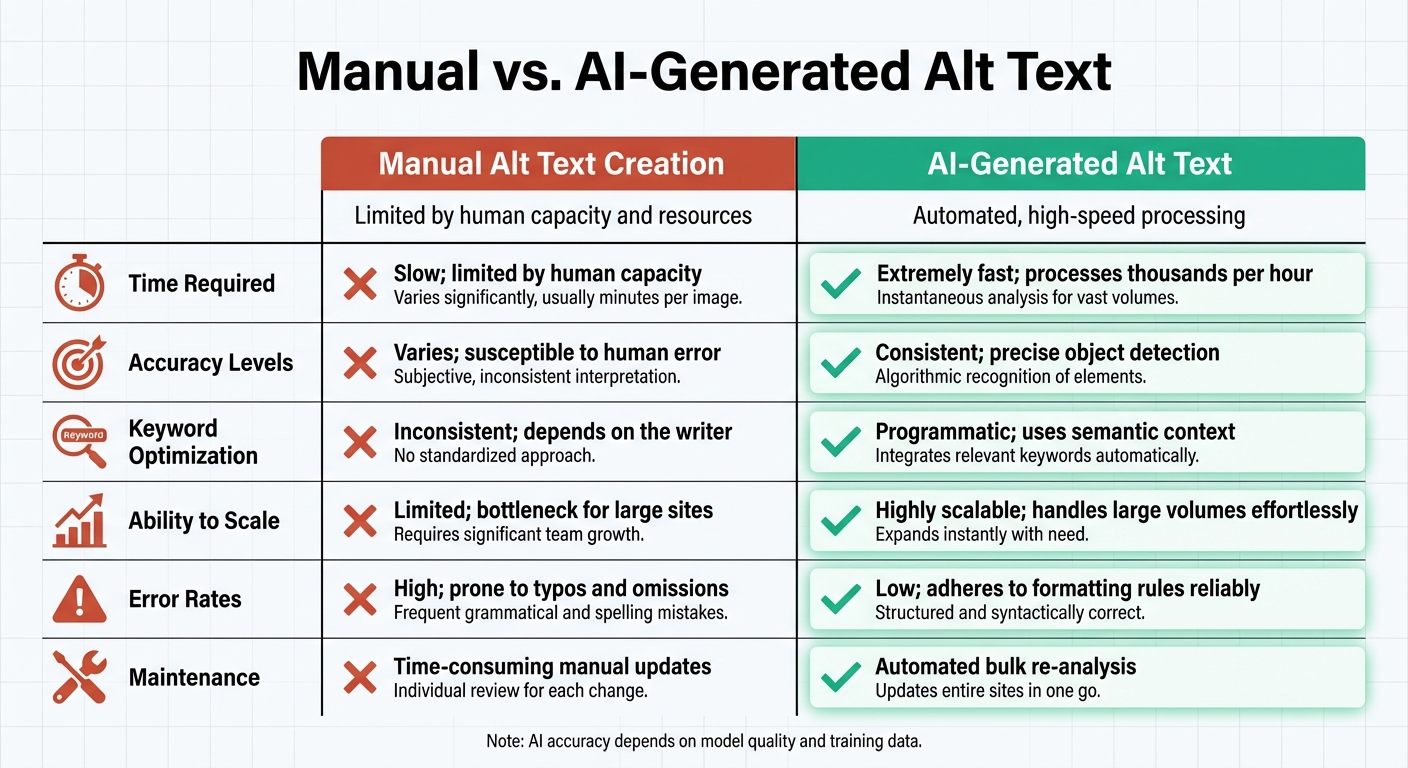
Manual vs AI-Generated Alt Text: Speed, Accuracy, and Scalability Comparison
AI tools make scaling image descriptions for large websites much easier. While humans can only write so many descriptions in a given time, AI can handle thousands at once. For instance, an e-commerce brand managing a massive product catalog saved over 15 hours each week by automating alt text creation for their images [3][9]. For businesses with extensive visual content, like online stores or media companies, this kind of efficiency is a game-changer.
Another advantage is consistency. Human writers often vary in style or level of detail when creating alt text, but AI ensures uniformity across all descriptions. This means a product like a "blue slim-fit blazer" will be described the same way, whether it’s uploaded today or six months from now [3][4]. Such consistency not only improves the user experience but also aids search engines in crawling your site effectively.
AI also simplifies accessibility compliance. By default, many AI tools are designed to meet standards like WCAG and ADA. They create descriptions that work seamlessly with screen readers and stay within the 125-character limit most assistive technologies require [3][8]. With over 2.2 billion people worldwide living with vision impairments [1], this automation ensures that your content is accessible to a broader audience.
Beyond accessibility, AI-generated alt text can improve your site’s SEO. Modern AI doesn’t just identify objects – it incorporates semantic context, which can strengthen your site’s topical authority. Some e-commerce companies have seen up to a 20% increase in traffic from Google Images within just two months of implementing AI-generated alt text [1][9].
Here’s a quick comparison to illustrate how AI outshines manual alt text creation:
Manual vs. AI-Generated Alt Text
| Feature | Manual Alt Text Creation | AI-Generated Alt Text |
|---|---|---|
| Time Required | Slow; limited by human capacity [3] | Extremely fast; processes thousands per hour [3] |
| Accuracy Levels | Varies; susceptible to human error [3] | Consistent; precise object detection [3] |
| Keyword Optimization | Inconsistent; depends on the writer [3] | Programmatic; uses semantic context [3] |
| Ability to Scale | Limited; bottleneck for large sites [3] | Highly scalable; handles large volumes effortlessly [3] |
| Error Rates | High; prone to typos and omissions [3] | Low; adheres to formatting rules reliably [3] |
| Maintenance | Time-consuming manual updates [3] | Automated bulk re-analysis [3] |
Where AI Alt Text Falls Short
AI has undoubtedly made strides in improving efficiency, but it still has its shortcomings, especially when it comes to SEO performance and accessibility. One of the biggest issues is contextual blindness. While AI can recognize objects in an image, it often misses the purpose or significance of that image. As Rounak Agrawal, a UX/UI Designer, explains:
"AI sees what’s in the image, but not why it matters" [11].
Take, for instance, a photo of a protest. AI might describe it as "a group of people outdoors", completely overlooking the event’s deeper social or political context.
Another limitation lies in how AI handles cultural nuances and brand context. It often interprets symbols and traditions too literally, missing their broader meaning. For example, a Maori dancer performing a ceremonial haka might be reduced to "a person with his tongue out", erasing the cultural significance of the act. Similarly, AI might describe Nike’s iconic "Swoosh" as "a simple black checkmark", ignoring its branding power. Incorrect role identification is another issue. A person in a white coat could be a doctor, a butcher, or a lab technician, but AI often opts for a generic description. Worse, biased datasets can lead to harmful stereotypes, such as labeling a female scientist as a nurse [11].
When it comes to complex visuals like charts, graphs, or infographics, AI struggles even more. While it might identify a "pie chart", it usually fails to extract key insights or summarize the data – details that are crucial for users relying on screen readers [3]. Functional elements like buttons or icons also pose challenges. AI might describe a magnifying glass icon as just that – "a magnifying glass" – instead of conveying its purpose, such as "Search", which is critical for accessibility.
These flaws make it clear that automated alt text needs human intervention to truly deliver. The solution isn’t to dismiss AI altogether but to combine automation with human review. Dave Davies puts it well:
"AI can provide some basic context and provide a good start to generating alt text, a human is still needed to ‘sense-check’ the image and provide more context to the alt text that AI isn’t able to" [10].
AI works best for handling large volumes of images quickly, but human editors are essential for refining descriptions of high-impact visuals like hero banners, product images, or anything with cultural or emotional significance. This collaboration between AI’s speed and human expertise forms the backbone of the solutions offered by My Rich Brand. Next, discover how to seamlessly integrate AI-generated alt text with My Rich Brand’s tailored strategies.
How to Use AI Alt Text with My Rich Brand
Getting started with My Rich Brand’s AI-powered alt text is straightforward. The Steady SEO plan ($499/month) provides AI-driven, SEO-friendly alt text that aligns with WCAG and ADA standards. While the Starter SEO plan focuses on basic keyword research and content, the Steady SEO plan introduces AI automation to handle large-scale alt text creation [13]. This blend of technology and expertise ensures a smooth integration of AI efficiency with human refinement.
The system uses a hybrid approach: AI handles 80% of the workload, while human experts fine-tune the remaining 20% to ensure the descriptions align with your brand’s voice and context [13]. This human touch adds depth, addressing cultural and emotional subtleties that AI alone might miss.
For websites with thousands of images lacking descriptions, the efficiency gains are substantial. AI tools can process a catalog that would otherwise require 167 hours of manual labor for 20,000 images [5]. This automation translates to an average of 40 hours saved per month [12], freeing up your team to focus on strategic tasks instead of repetitive data entry.
The system also incorporates intelligent keyword research to embed audience-specific terms into image descriptions [13]. It keeps alt text concise – between 80 and 140 characters – and uses empty alt attributes (alt="") for decorative images [5][8]. This ensures your descriptions are optimized and adaptable to shifting search trends.
What sets this approach apart is its ability to adjust strategies in real time based on evolving search patterns [13]. This keeps your alt text relevant for the over 20% of Google searches that involve images [5]. The result is a scalable system that combines the speed of AI with the accuracy and context that only human oversight can deliver.
Conclusion
AI has transformed how businesses approach alt text creation. Tasks that once took 160 hours can now be completed in just minutes [5][14]. This efficiency not only saves time but also improves SEO and accessibility, offering a clear advantage. With a staggering 96.3% of websites failing basic WCAG compliance tests [5], automated alt text creation provides a crucial opportunity to enhance accessibility for millions while gaining a competitive edge [5][1].
That said, speed and scale alone aren’t enough to meet every requirement. While AI is excellent for maintaining consistency and handling large volumes of data, it has its limitations. As Saood Zafar from ClickRank explains:
"AI is a tool for speed, not a replacement for strategic human input" [8].
The best results come from blending AI’s capabilities with human expertise. This ensures alt text reflects your brand’s voice, captures cultural nuances, and provides the right context.
Optimized alt text also plays a critical role in Generative Engine Optimization (GEO), helping your brand appear in AI-driven search results on platforms like ChatGPT, Perplexity, and Google’s AI Overviews [14][2]. With 37% of search results now including images [1], this isn’t optional – it’s essential.
By integrating SEO and GEO strategies, you can build a scalable solution tailored to your needs. For example, My Rich Brand’s Steady SEO plan, priced at $499/month, combines AI efficiency with human insight. This hybrid approach ensures your alt text aligns with WCAG and ADA standards while naturally incorporating the keywords your audience is searching for. It’s a system designed to grow alongside your business and adapt to ever-changing search trends.
If your website contains hundreds – or even thousands – of images without proper alt text, you’re missing out on valuable traffic and accessibility improvements. Adopting the right strategy allows you to fully leverage this technology, maximizing both SEO benefits and user accessibility.
FAQs
When should I edit AI-generated alt text?
Edit alt text for images if it doesn’t clearly describe the content, misses key details, or doesn’t align with accessibility and SEO guidelines. Regularly reviewing and updating alt text ensures it remains descriptive, relevant, and helpful for both users and search engines.
How do I avoid keyword stuffing in alt text?
When writing alt text, prioritize clarity and relevance over cramming in keywords. Use concise descriptions that naturally highlight the key details of the image. Aim to keep alt text under 125 characters to maintain readability and effectiveness. By focusing on accessibility and writing in a natural, user-friendly tone, you ensure the text remains helpful without falling into the trap of keyword stuffing.
How can I tell if my alt text meets WCAG and ADA rules?
To ensure your alt text aligns with WCAG and ADA guidelines, keep it clear, descriptive, and relevant to the image’s context. Alt text should assist screen readers, remain concise (ideally between 80–140 characters), and highlight the image’s purpose. These practices enhance accessibility and ensure compliance.