


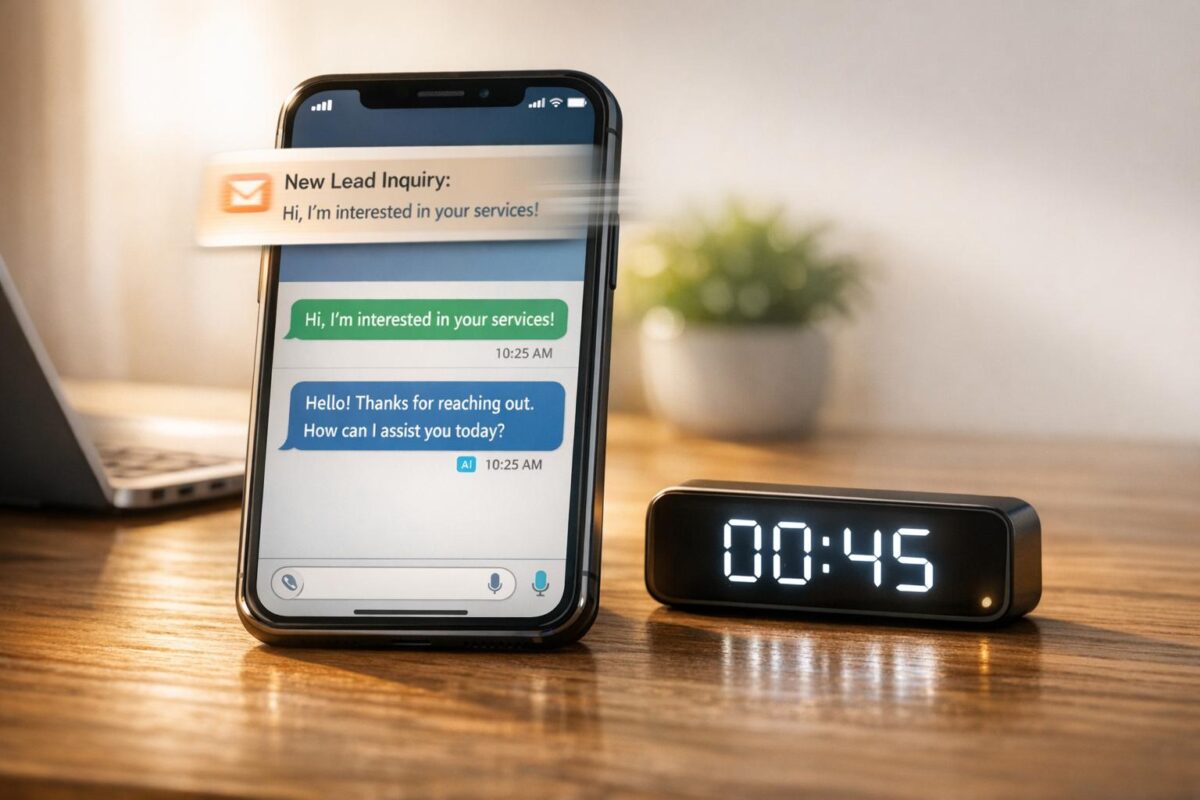
When it comes to responding to leads, speed is everything. Studies show that replying within one minute can increase conversions by 391%, while waiting just five minutes makes you 21 times less likely to qualify a lead. Yet, most businesses take an average of 42 hours to respond, missing out on opportunities. AI solves this by automating lead engagement, ensuring instant replies, 24/7 availability, and smarter lead qualification.
Key Takeaways:
- Fast Responses: AI reduces response times to under 60 seconds compared to the 42-hour average.
- 24/7 Engagement: Handles 40-44% of leads that come in after hours.
- Improved Efficiency: Automates tasks like lead routing, research, and CRM updates, saving hours of manual work.
- Higher Conversions: AI-powered systems increase lead-to-opportunity conversion rates from 3-5% to 12-18%.
With tools like chatbots, automated routing, and CRM integration, you can optimize your online presence to ensure no lead goes unanswered, even outside business hours. Companies using AI report faster response times, better lead prioritization, and a significant boost in sales revenue.
Want to transform your lead response process? AI is the answer.
Lead response time is the no. 1 lever you can improve right now to massively improve conversion rate
sbb-itb-c00c5b1
How AI Reduces Lead Response Time
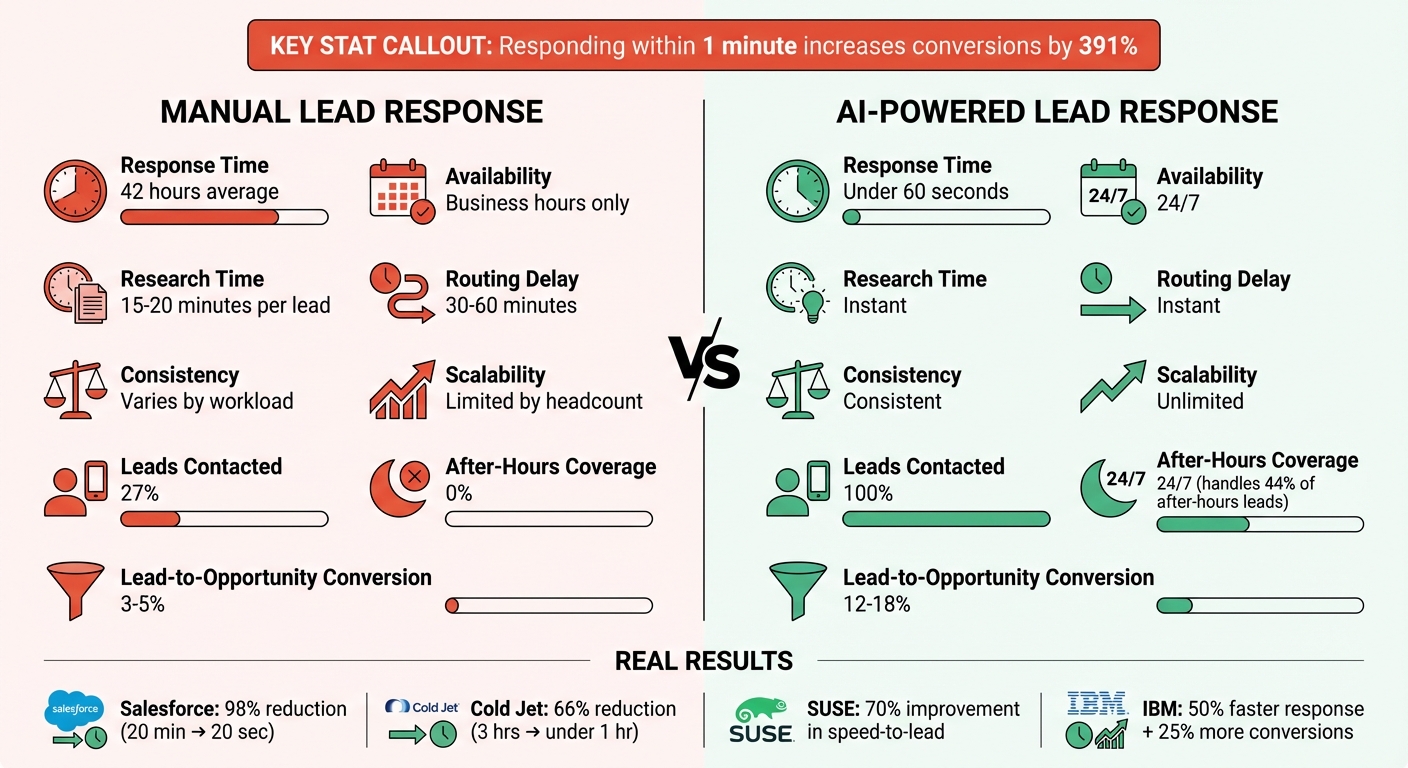
AI vs Manual Lead Response: Speed and Performance Comparison
AI has turned lead response into a near-instant process, replacing the delays of traditional manual systems. While older methods often resulted in response times stretching to 13 hours, automated AI-powered systems can respond in under 60 seconds. On average, companies using automated lead routing see response times of just 3.5 hours – a 73% improvement [2][4].
This leap in efficiency comes from eliminating three key bottlenecks in sales workflows: manual routing (which typically takes 30–60 minutes), lead research (15–20 minutes), and CRM entry (5–10 minutes). With AI, these tasks are handled instantly, all at once.
"The best routing isn’t just fast. It’s invisible. The lead fills out a form, and the right rep gets pinged instantly – no human triage, no territory disputes, no grey zone where ownership is unclear."
- Nadeem Azam, Founder, Rep [2]
Real-world cases show how transformative this can be. In January 2026, Salesforce integrated its legacy systems into its Data Cloud, slashing its lead response time from 20 minutes to just 20 seconds – a 98% reduction [2]. Similarly, Cold Jet used HubSpot Sales Hub to consolidate lead data and automate its first-touch engagement, cutting response time from 3 hours to under 1 hour (a 66% reduction) [2].
Automated Lead Capture and Routing
AI captures leads across multiple channels – website forms, chatbots, SMS, WhatsApp, email, and social media ads – and routes them to the appropriate person instantly [9]. It evaluates each lead in real time, matching it to the most qualified rep based on factors like expertise, territory, or deal size [2][4]. Tools such as Clearbit and ZoomInfo further enhance this process by automatically enriching CRM entries with firmographic data (e.g., company size, industry, or funding status) the moment a lead is captured [2][8]. This ensures that every inquiry arrives with full context, eliminating research delays.
AI systems operate around the clock, engaging 44%–50% of leads that come in outside of regular business hours [2][4]. For example, if a lead submits a form at 11 PM on a Saturday, the system can respond immediately, qualify the prospect, and even schedule a meeting for the following week. In early 2026, SUSE implemented LeanData for automated routing with priority-based SLAs, achieving a 70% improvement in speed-to-lead and a 100% SLA attainment rate. High-intent leads were responded to in just 1.3 hours on average [2].
AI Chatbots for Instant Engagement
AI chatbots take immediate engagement to the next level. Unlike basic auto-responders, modern conversational AI uses Natural Language Processing to ask qualifying questions, interpret unscripted responses, and even handle complex topics like budget discussions, decision-maker identification, and timelines [5][10].
These chatbots scale effortlessly, managing hundreds of conversations at once without any drop in performance [4][5]. During high-volume campaigns, this eliminates queues and keeps prospects engaged. They also work across multiple channels simultaneously – whether it’s web chat, SMS, or automated voice calls [1][5]. SMS proves particularly effective, boasting a 98% open rate, with 90% of messages read within three minutes [1]. When a lead submits a form, the AI can instantly initiate an SMS, start a chat, and even trigger a phone call – all within the first minute.
"AI enables businesses to create smarter, 24/7 support systems and targeted campaigns, revolutionising customer engagement."
- Kieran Flanagan, SVP of Marketing, HubSpot [1]
In July 2025, Steve Hastert, Director of Revenue Marketing at Vendavo, used Zapier-powered AI automation to capture leads from Google Ads and route them directly to the CRM. This reduced lead response time by 90%, taking it from hours to mere minutes. Additionally, an AI chatbot trained on product PDFs managed over 120 conversations monthly without requiring additional staff [11].
"If it goes to a human on email, you’re lucky to get to it the same day – now it’s automatic. Leads aren’t slipping through the cracks anymore."
- Steve Hastert, Director of Revenue Marketing and Operations, Vendavo [11]
When a chatbot identifies a high-value lead, it seamlessly transitions the interaction to a human rep, providing a detailed summary of the conversation to ensure continuity.
Lead Prioritization and Task Automation
AI assigns numerical scores to leads based on factors like job title, company size, and behavioral signals (e.g., email clicks or visits to pricing pages). This helps single out high-intent prospects [12]. Advanced systems go further by using predictive intelligence to analyze language patterns and historical data, determining the "next best action" in real time [13].
This allows sales teams to focus on leads with the highest potential. High-priority leads are routed to senior reps, while lower-scoring leads are placed into nurture sequences. Predictive intelligence ensures immediate attention for the most urgent prospects [1][9].
Automation also streamlines follow-ups. For instance, when a high-value lead submits a form, the system might send an SMS instantly, follow up with a phone call within two minutes, and send an email five minutes later to maintain engagement [2]. In June 2025, IBM combined AI-powered chatbots with automated email responders, cutting lead response time by 50% and increasing conversions by 25% [7].
Scheduling tools like Chili Piper and Calendly integrate directly into workflows, allowing qualified leads to book meetings immediately after submitting a form [2][8]. This eliminates the back-and-forth scheduling process and can double form-to-meeting conversion rates.
| Aspect | Manual Process | AI Automation |
|---|---|---|
| Response Time | 42 hours (average) | Under 60 seconds |
| Availability | Business hours only | 24/7 |
| Research Time | 15–20 minutes per lead | Instant |
| Routing Delay | 30–60 minutes | Instant |
| Consistency | Varies by workload | Consistent |
| Scalability | Limited by headcount | Unlimited |
The results speak for themselves. Businesses using AI for lead scoring and routing report an average 25% increase in sales revenue [7]. By ensuring no lead is ignored, high-priority prospects are immediately addressed, and every opportunity is acted upon faster than ever before.
Connecting AI with Your CRM and Marketing Tools
AI shines when it works hand-in-hand with your existing systems. Without proper integration, even the most advanced AI can slow things down if data isn’t shared seamlessly. The goal? Build a workflow where every lead interaction – whether it’s through a chatbot, email, or SMS – automatically updates your CRM in real time and triggers the right follow-up actions across all channels.
CRM Integration for Real-Time Updates
AI connects to your CRM using tools like native connectors, no-code middleware, or direct API/webhook setups [14][16]. Once linked, it pulls key details – like intent, sentiment, contact information, and BANT criteria – from conversations and updates the relevant CRM fields [14][16].
The best integrations work both ways. For example, when a deal stage changes in your CRM, that update feeds back into the AI’s knowledge base. This ensures future interactions reflect the lead’s current status [14]. This two-way flow also tackles a classic CRM challenge: manual deal updates, which are often delayed by 48 hours or more. Real-time syncing prevents these delays, helping sales teams maintain momentum [14]. It also enables “hot moment detection,” where specific actions – like a lead visiting your pricing page – trigger instant AI follow-ups or alerts for sales reps [15][16].
AI chatbots can cut down manual CRM data entry by up to 90% [14]. For instance, when a chatbot scores a lead during a live chat based on BANT criteria, it can automatically assign high-priority prospects to the right sales rep – completely hands-free [16][17].
"CRM is the system of record, AI is the system of action."
Before diving into integration, it’s critical to map your CRM fields – like Lead Source, Sentiment Score, and BANT attributes – to ensure accurate data capture [16]. Use deterministic JSON output to minimize logging errors, and clean your data by standardizing formats (e.g., lowercasing emails and trimming spaces) to avoid duplicates [14][16]. Also, set up a “human handoff” trigger so the AI knows when to transfer conversations to a live rep (e.g., when it detects keywords like “talk to a person” or “pricing negotiation”). These transfers should include a full chat transcript attached to the CRM record [16][17].
AI doesn’t stop at syncing CRM data. It also coordinates multichannel outreach to keep engagement consistent across platforms.
Multichannel Response Automation
AI isn’t limited to a single channel – it works across email, SMS, WhatsApp, LinkedIn, and chat simultaneously [17]. If a lead responds on one channel, the CRM updates globally to avoid redundant outreach. This is especially important as buyers now expect to engage on the platforms they prefer.
AI takes things a step further by analyzing digital behavior and time zones to suggest the best times to reach out, with 85–92% accuracy [15]. Instead of sending messages at random times, it learns when each prospect is most likely to respond and schedules follow-ups accordingly [19]. This matters because leads contacted within five minutes are 21 times more likely to convert than those contacted after 30 minutes [15][19][7].
For WhatsApp, messages must use pre-approved templates to comply with Meta’s policies [19]. Across all channels, make sure to include opt-out options and secure explicit consent to stay compliant with GDPR and CCPA regulations [19][17].
This coordinated approach not only speeds up individual responses but also ensures a consistent, unified engagement strategy.
| Feature | Traditional Automation | AI-Powered CRM Integration |
|---|---|---|
| Data Entry | Manual or basic form mapping | Automated extraction from natural conversation [14] |
| Lead Scoring | Static rules (e.g., "downloaded ebook") | Real-time behavioral and intent analysis [15][18] |
| Update Speed | Often delayed by 48+ hours | Instant updates via webhooks [14][16] |
| Personalization | Basic merge fields (e.g., "Hi [Name]") | Context-aware based on full interaction history [17] |
Companies using generative AI in their CRM workflows are 83% more likely to surpass sales goals [15]. The trick is keeping your CRM as the system of record while letting AI handle the heavy lifting – logging interactions, summarizing conversations, and scoring leads automatically [17].
Steps to Implement AI for Faster Lead Response
You can integrate AI into your sales process without starting from scratch. The key is to assess your current workflow, select tools that align with your goals, and consistently track performance. Let’s break it down, starting with your lead management process.
Review Your Current Lead Management Process
Before diving into automation, you need to understand your starting point. Take a close look at 90 days of CRM data to measure lead response times. Pinpoint where delays happen – are some team members juggling too much? Are web form leads slower to respond to than phone inquiries? And what about after-hours leads – are they slipping through the cracks? Often, addressing after-hours gaps offers the most room for improvement.
Another important metric is your lead contact rate – the percentage of leads your team actually engages with. Shockingly, most companies only reach out to about 27% of their leads [8]. That’s a lot of missed opportunities. Clearly define your qualification criteria, such as using the BANT framework (Budget, Authority, Need, Timeline), so you can train the AI to ask the right questions [5]. Also, consolidate all your lead sources into a single CRM or unified inbox. This step ensures no leads get lost between communication channels before you introduce automation [6].
"In sales, speed doesn’t just matter – it’s everything. The first business to respond doesn’t just get a chance to compete. They get to set the terms, build the relationship, and win the customer before the competition even knows there’s an opportunity."
- AdStorm Media & AI [6]
Select AI Tools That Fit Your Business
Once you’ve identified the bottlenecks, it’s time to choose tools that address them. For small and medium-sized businesses, all-in-one platforms that combine chatbots, email automation, and CRM integration can be a game-changer [20].
Take My Rich Brand‘s AIME™ (AI Marketing Ecosystem), for example. Their Starter Plan ($599/month) includes AI chatbot installation, CRM integration, and automated email welcome sequences – perfect for businesses just getting started [20]. The Growth Plan ($999/month) adds advanced chatbot flows and lead nurturing, while the Elite Plan ($1,499/month) offers full sales funnel management and comprehensive email automation [20]. These plans balance AI and human expertise, with AI handling tasks like initial responses and data gathering, while humans ensure the brand voice and relationships remain authentic [20].
Start small by piloting AI with one high-priority lead source, such as demo requests or pricing inquiries. This approach lets you gather feedback, ensure team buy-in, and measure ROI before rolling it out across all channels [4]. Make sure the tools integrate seamlessly with your existing CRM (like Salesforce or HubSpot) and communication platforms (email, Slack, SMS) to avoid any disruptions in lead management [20].
Track and Improve Performance Metrics
Once your AI tools are up and running, it’s crucial to measure their impact. Focus on metrics like First Response Time (FRT) – aim to respond to high-intent leads, like demo requests, in under 60 seconds [4]. This “platinum minute” can boost conversion rates by a staggering 391% compared to slower responses [4].
Other metrics to monitor include Lead Contact Rate, Lead Qualification Rate, and Lead-to-Opportunity Conversion Rate [21]. Break these down by lead source and channel (email, SMS, chat) to see where AI is making the biggest difference. Use median response times rather than averages to avoid skewed data from outliers [4]. You can also segment by time of day to spot after-hours gaps and calculate time saved on manual tasks like data entry.
AI isn’t just about speed – it’s about cost-effectiveness too. Automation can slash the cost per qualified meeting from $400–$550 to just $150–$200 [4]. Companies that integrate AI into their sales workflows are also 83% more likely to hit their revenue targets [15].
| Metric | Without AI | With AI |
|---|---|---|
| Average Response Time | 42 hours [4] | < 60 seconds [4] |
| Leads Contacted | 27% [4] | 100% [4] |
| After-Hours Coverage | 0% [4] | 24/7 [4] |
| Lead-to-Opportunity Conversion | 3–5% [4] | 12–18% [4] |
Review these metrics monthly and tweak your AI workflows as needed. If you notice consistent drop-offs, adjust chatbot scripts or refine qualification logic. Regular reviews and small adjustments can lead to steady improvements over time.
Conclusion
In sales, speed is everything. Responding to leads within 60 seconds makes you 391% more likely to convert them and gives you the edge to capture the 78% of customers who choose the first responder [1][3]. This isn’t just about staying competitive – it’s about seizing opportunities that directly impact your revenue.
The numbers back it up: AI can push lead-to-opportunity conversion rates from just 3–5% to 12–18%, while 24/7 availability ensures you don’t miss out on the 44% of leads that come in after hours [4]. My Rich Brand’s AIME™ system is a game-changer, with a 40% boost in lead conversions and 50% faster campaign execution [20]. By letting AI cover repetitive tasks while human experts focus on strategy, this 80/20 approach delivers both efficiency and the personal touch customers value.
The cost of inaction is steep. Slow or inconsistent responses can drain 30–50% of potential revenue, especially when the average company takes 42 hours to respond and contacts only 27% of leads [4][6]. Why let your business be part of that statistic?
My Rich Brand makes it easy to get started. The Starter Plan, priced at $599/month, includes AI chatbot installation, CRM integration, and automated email sequences [20]. Ready to scale? The Growth Plan ($999/month) and Elite Plan ($1,499/month) add advanced lead nurturing and full sales funnel management [20]. With automated lead generation delivering a $5.44 return for every dollar invested over three years [8], the investment pays for itself.
Take action today and stay ahead of the competition. Don’t let opportunities pass you by.
FAQs
What should my first-response-time goal be?
Your first-response-time target should be under 5 minutes. Why? Responding within this timeframe can make a massive difference – boosting lead qualification by up to 21 times and increasing conversions by as much as 391%. Quick responses not only grab attention but also help you stay ahead in today’s fast-moving markets.
How do I integrate AI with my CRM safely?
To integrate AI into your CRM securely, focus on safeguarding data, ensuring compliance, and maintaining data accuracy. Start by implementing encryption and access controls to protect sensitive information. Next, audit and standardize your CRM data to ensure it’s accurate and reliable. Set clear objectives for the integration, such as enhancing lead response times or streamlining workflows.
Select tools that comply with regulations like GDPR or CCPA, depending on your location and industry. Finally, keep a close eye on performance metrics to confirm that the integration remains secure and effective over time.
When should AI hand off a lead to a human?
When an AI system has sufficiently engaged with or qualified a lead – like completing initial questions or identifying the need for a personal touch – it’s time to transfer the interaction to a human. This is especially important for handling complex or high-value inquiries that demand human expertise.
The key is ensuring the handoff happens smoothly and quickly, ideally within seconds to a minute. A seamless transition keeps the lead engaged and ensures they receive the best possible experience.